Recently in storage Category

The Department of Government Efficiency, Musk's vehicle. made news by "discovering" the General Services Administration uses tapes, and plans to save $1M by switching to something else (disks, or cloud-based storage). Long time readers of this blog may remember I used to talk a lot about storage and tape backup. Guess it's time to get my antique Storage Nerd hat out of the closet (this is my first storage post since 2013) to explain why tape is still relevant in an era of 400Gb backbone networks and 30TB SMR disks.

The SaaS revolution has utterly transformed the office automation space. The job I had in 2005, in the early years of this blog, only exists in small pockets anymore. So many office systems have been SaaSified that the old problems I used to blog about around backups and storage tech are much less pressing in the modern era. Where we have stuff like that are places that have decades of old file data, starting in the mid to late 1980s, that is still being hauled around. Even when I was still doing this in the late 2000s the needle was shifting to large arrays of cheap disks replacing tape arrays.

Where you still see tape being used here are offices with policies for "off-site" or "offline" storage of key office data. A lot of that stuff is also done on disk these days, but some offices still kept their tape libraries. The InfoSec space is keen to point out you can't crypto-locker an offline tape, so offline tape is a useful tool in recovering from a ransomware incident. I suspect a lot of what DoGE found was in this category of offices retaining tape infrastructure. Is disk cheaper here? Marginally, the true savings will be much less than the $1M headline rate.

But there is another area where tape continues to be the economical option, and it's another area DoGE is going to run into: large scientific datasets.

To explain why, I want to use a contrasting example: A vacation picture you took on an iPhone in 2011, put into Dropbox, shared twice, and haven't looked at in 14 years. That file has followed you to new laptops and phones, unseen, unloved, but available. A lot goes into making sure it's available.

All the big object-stores like S3, and file-sync-and-share services (like Dropbox, Box, MS live, Google Drive, Proton Drive, etc) use a common architecture because this architecture has been proven to be reliable at avoiding visible data-loss:

  • Every uploaded file is split into 4KB blocks (the size is relevant to disk technology, which I'm not going into here)
  • Each block is written between 3 and 7 times to disk in a given datacenter or region, the exact replication factor changes based on service and internal realities
  • Each block is replicated to more than one geographic region as a disaster resilience move, generally at least 2, often 3 or more

The end result of the above is that the 1MB vacation picture is written to disk 6 to 14 different times. The nice thing about the above is you can lose an entire rack-row of a datacenter and not lose data; you might lose 2 of your 5 copies of a given block, but you have 3 left to rebuild, and your other region still has full copies.

But I mentioned this 1MB file has been kept online for 14 years. Assuming an average disk life-span of 5 years, each block has been migrated to new hardware 3 times in those years. Meaning each 4KB block of that file has been resident on between 24 and 42 hardrives; or more, if your provider replicates to more than 2 discrete geographic region. Those drives have been spinning and using power (and therefore requiring cooling) the entire time.

These systems need to go to all of this effort because they need to be sure that all files are available all the time, when you need it, where you need it, as fast as possible. If a person in that vacation photo retires, and you suddenly need that picture for the Retirement Montage at their going away party, you don't want to wait hours for it to come off tape. You want it now.

Contrast this to a scientific dataset. Once the data has stopped being used for Science! it can safely be archived until someone else needs to use it. This is the use-case behind AWS S3 Glacier: you pay a lot less for storing data, so long as you're willing to accept delays measurable in hours before you can access it. This is also the use-case where tape shines.

A lab gets done chewing on a dataset sized at 100TB, which is pretty chonky for 2011. They send it to cold storage. Their IT section dutifully copies the 100TB dataset onto LTO-5 drives at 1.5TB per tape, for a stack of 67 tapes, and removes the dataset from their disk-based storage arrays.

Time passes, as with the Dropbox-style data. LTO drives can read between 1 and 2 generations prior. Assuming the lab IT section keeps up on tape technology, it would be the advent of LTO-7 in 2015 that would prompt a great restore and rearchive effort of all LTO-5 and previous media. LTO-7 can do 6TB per tape, for a much smaller stack of 17 tapes.

LTO-8 changed this, with only a one version lookback. So when LTO-8 comes out in 2017 with a 9TB capacity, a read restore/rearchive effort runs again, changing our stack of tapes from 17 to 12. LTO-9 comes out in 2021 with 18TB per tape, and that stack reduces to 6 tapes to hold 100TB.

All in all, our cold dataset had to relocate to new media three times, same as the disk-based stuff. However, keeping stacks of tape in a climate controlled room is vastly cheaper than a room of powered, spinning disk. The actual reality is somewhat different, as the few data archive people I know mention they do great restore/archive runs about every 8 to 10 years, largely driven by changes in drive connectivity (SCSI, SATA, FibreChannel, Infiniband, SAS, etc), OS and software support, and corporate purchasing cycles. Keeping old drives around for as long as possible is fiscally smart, so the true recopy events for our example data is likely "1".

So another lab wants to use that dataset and puts in a request. A day later, the data is on a disk-array for usage. Done. Carrying costs for that data in the intervening 14 years are significantly lower than the always available model of S3 and Dropbox.

Tape: still quite useful in the right contexts.

Getting it wrong on the Internet

A few days ago, the Reddit reaction to the announcement of Dropbox's general availability resurfaced:

For a Linux user, you can already build such a system yourself quite trivially by getting an FTP account, mounting it locally with curlftpfs, and then using SVN or CVS on the mounted filesystem. From Windows or Mac, this FTP account could be accessed through built-in software

My response? Well, it turns out I posted that back in 2011: https://sysadmin1138.net/mt/blog/2011/08/your-very-own-dropbox-that-isnt-dropbox.shtml

Novell iFolder. It totally was file-sync-and-share (FSS) like Dropbox, but you hosted it yourself. Here is a Wayback Machine link to the iFolder product page circa 2011. Not only that, I first blogged about iFolder way back in 2005. I was very skeptical about Dropbox when it first came out, simply because I'd been using a technology just like that for years already.

However...

What I failed to grasp was that Dropbox was cloud-based, networks were now fast enough for an Internet-based FSS solution, and Dropbox would work on mobile w-a-y faster than Novell ever managed. In short, first-mover is not always best-mover.

Today, the FSS space is crowded and the corporate managed file-servers I spent 14 years of my career maintaining are antiquated relics mostly found in large universities and older enterprises. These days if your word processor or spreadsheet maker isn't putting files directly into the cloud (Office 365, Google Apps, etc), you're putting the files into a directory that is synced to the cloud using an FSS solution.

Redundancy in the Cloud

Strange as it might be to contemplate, but imagine what would happen if AWS went into receivership and was shut down to liquidate assets? What would that mean for your infrastructure? Project? Or even startup?

It would be pretty bad.

Startups have been deploying preferentially on AWS or other Cloud services for some time now, in part due to venture-capitalist push to not have physical infrastructure to liquidate should the startup go *pop* and to scale fast should a much desired rocket-launch happen. If AWS shut down fully for, say, a week, the impact to pretty much everything would be tremendous.

Or what if it was Azure? Fully debilitating for those that are on it, but the wide impacts would be less.

Cloud vendors are big things. In the old physical days we used to deal with the all-our-eggs-in-one-basket problem by putting eggs in multiple places. If you're on AWS, Amazon is very big about making sure you deploy across multiple Availability Zones and helping you become multi-region in the process if that's important to you. See? More than one basket for your eggs. I have to presume Azure and the others are similar, since I haven't used them.

Do you put your product on multiple cloud-vendors as your more-than-one-basket approach?

It isn't as easy as it was with datacenters, that's for sure.

This approach can work if you treat the Cloud vendors as nothing but Virtualization and block-storage vendors. The multiple-datacenter approach worked in large part because colos sell only a few things that impact the technology (power, space, network connectivity, physical access controls), though pricing and policies may differ wildly. Cloud vendors are not like that, they differentiate in areas that are technically relevant.

Do you deploy your own MySQL servers, or do you use RDS?
Do you deploy your now MongoDB servers, or do you use DynamoDB?
Do you deploy your own CDN, or do you use CloudFront?
Do you deploy your own Redis group, or do you use SQS?
Do you deploy your own Chef, or do you use OpsWorks?

The deeper down the hole of Managed Services you dive, and Amazon is very invested in pushing people to use them, the harder it is to take your toys and go elsewhere. Or run your toys on multiple Cloud infrastructures. Azure and the other vendors are building up their own managed service offerings because AWS is successfully differentiating from everyone else by having the widest offering. The end-game here is to have enough managed services offerings that virtual private servers don't need to be used at all.

Deploying your product on multiple cloud vendors requires either eschewing managed-services entirely, or accepting greater management overhead due to very significant differences in how certain parts of your stack are managed. Cloud vendors are very much Infrastructure-as-Code, and deploying on both AWS and Azure is like deploying the same application in Java and .NET; it takes a lot of work, the dialect differences can be insurmountable, and the expertise required means different people are going to be working on each environment which creates organizational challenges. Deploying on multiple cloud-vendors is far harder than deploying in multiple physical datacenters, and this is very much intentional.

It can be done, it just takes drive.

  • New features will be deployed on one infrastructure before the others, and the others will follow on as the integration teams figure out how to port it.
  • Some features may only ever live on one infrastructure as they're not deemed important enough to go to all of the effort to port to another infrastructure. Even if policy says everything must be multi-infrastructure, because that's how people work.
  • The extra overhead of running in multiple infrastructures is guaranteed to become a target during cost-cutting drives.

The ChannelRegister article's assertion that AWS is now in "too big to fail" territory, and thus requiring governmental support to prevent wide-spread industry collapse, is a reasonable assertion. It just plain costs too much to plan for that kind of disaster in corporate disaster-response planning.
The new era of big storage...

| 2 Comments

...is full of flash. And that changes things.

Not a surprise at all to anyone paying attention, but there it is. Flash is changing things in many ways:

  • Hybrid SSD+HD drives are now out there on the market, bringing storage tiering to the consumer space.
  • SSD is now kind of a standard for Laptops, or should be. The cheap option still has HD on it, but... SSD man. Just do it.
  • One SSD can fully saturate a 6Gb SATA or SAS link. This changes things:
    • A channel with 12 of those things is going to seriously under-utilize the individual drives.
    • There is no way a RAID setup (hardware, software, or ZFS) can keep up with parity calculations and still keep the drives performant, so parity RAID of any stripe is a bad choice.
    • A system with a hundred of these things on it, channeled appropriately of course, won't have enough system-bus speed to keep them fed.
  • Large scale enterprise systems are increasingly using a SSD tier for either caching or top-level tiering (not all solutions are created equal).
    • ZFS L2ARC + Log
  • They're now coming in PCIe flavors so you don't even have to bother with a HBA.
    • Don't have to worry about that SAS speed-limit anymore.
    • Do have to worry about how many PCIe slots you've got.

Way back in elder days, when Windows NT was a scrappy newcomer challenging the industry dominant incumbent and and said incumbent was making a mint on selling certifications, I got one of those certifications to be a player in the job market (it actually helped). In the studying for that certification I was exposed to a concept I had never seen before:

The Hierarchical Storage Management System.

NetWare had hooks for it. In short, it does for files what Storage Tiering does for blocks. Pretty easy concept, but required some tricky engineering when the bottom layer of the HSM tree was a tape library(1). All scaled-out (note, not distributed(2)) storage these days is going to end up using some kind of HSM-like system. At they very tippy-top you'll get your SSDs. They may even be in the next layer down as well. Spinning rust (disks) will likely form the tier that used to belong to spooling rust (tape), but they'll still be there.

And that tier? It can RAID5 all it wants. It may be 5 disk sets, but it'll have umpty different R5 sets to stripe across so it's all good. The famous R5 write-penalty won't be a big issue, since this tier is only written to when the higher tier is demoting data. It's not like the HSM systems of yore where data had to be promoted to the top tier before it could even be read, we can read directly from the slow/crappy stuff now!(3)

All flash solutions will exist, and heck, are already on the market. Not the best choice for bulk-storage, which is why they're frequently paired with big deduplication engines, but for things like, say, being the Centralized Storage Array for a large VM (sorry, "private cloud") deployment featuring hundreds/thousands of nearly identical VMs... they pay off.

Spinning disks will stick around the way spooling tape has stuck around. Farther and farther from the primary storage role, but still very much used.


[1]: Yes, these systems really did have a tape drive as part of a random-access storage system. If you needed a file off of tape, you waited. Things were slower back then, OK? And let us not speak of what happened when Google Desktop showed up and tried to index 15 years worth of archival data, and did so on 200 end-user workstations within a month.

[2]: Distributed storage is another animal. The flash presence there is less convincing, but it'll probably happen anyway.

[3]: Remember that bit about Google Desktop? Well... "How did we go from 60% used to 95% used on the home-directory volumes in a week? OUR USERS HAVEN'T BEEN THAT USERY!!!" That's what happened. All those brought-from-archive files now landed on the precious, precious hard-drives. Pain teaches, and we figured out how to access the lower tiers.

Also, I'm on twitter now. Thanks for reading.

Last year I created a commodity hardware based storage system. It was cheap, and I had confidence in the software that made it work. Still do, in fact.

I built the thing for massive scaling because that's just plain smart. We haven't hit the massive scaling part of the growth curve yet, but it's a lot closer to now than I was last year. So I thought big.

The base filesystem I chose is XFS, since I have experience with it, and it's designed from the bolts out for big. ZFS wasn't an option for a couple of reasons, and BTRFS wasn't mature enough for me to bet the business on it. One of the quirks of XFS is that it can bottleneck on journal and superblock writes, so I had to ensure that wouldn't get in the way.

Easy!

Put the XFS journal on an external device based on a SSD! Blazing fast writes, won't get in the way. Awesome.

But how to ensure that SSD could survive what was in essence a pure-write workload?

Multi-disk failures: follow-up

By far the biggest criticism to that piece are the following two ideas.

That's what the background scan process is for. It comes across a bad sector, it reallocates the block. That gets rid of the bad block w-a-y early so you don't ever actually get this problem.

And

That never happens with ZFS. It checksums blocks so it'll even recover the lost data as it's reallocating it.

Which are both very true. That's exactly what those background scanning processes are for, to catch this exact kind of bit-rot before it gets bad enough to trigger the multi-disk failure case I illustrated. Those background processes are important.

Even so, they also have their own failure modes.

  • Some only run when externally initiated I/O is quiet, which never happens for some arrays.
  • Some run constantly, but at low I/O priority. So for very big storage systems, each GB of space may only get scanned once a month if that often.
  • Some run just fine, thank you; they're just built wrong.
    • They only mark a sector is bad if it completely fails to read it; sectors that read just fine after the 1st or 2nd retry are passed.
    • They use an ERROR_COUNTER with thresholds set too high.
    • Successful retry-reads don't increment ERROR_COUNTER.
    • Scanning I/O doesn't use the same error-recovery heuristics as Recovery I/O. If Recovery I/O rereads a sector 16 times before declaring defeat, but Scanning only tries 3 times, you can hit an ERROR_COUNTER overflow during a RAID Recovery you didn't expect.
  • Some are only run on-demand (ZFS), and, well, never are. Or are run rarely because it's expensive.

I had mentioned I had seen this kind of fault recently. I have. My storage systems use just these background scanning processes, and it still happened to me.

Those background scanning processes are not perfect, even ZFS's. It's a balance between the ultimate paranoia of if there is any error ever, fail it! and the prudence of rebuilds are expensive, so only do them when we need to. Where your storage systems fall on that continuum is something you need to be aware of.

Disks age! Bad blocks tend to come in groups, so if each block is only getting scanned every few weeks, or worse every other month, a bad spot can take a disk out well before the scanning process detects it. This is the kind of problem that a system with 100 disks faces; back when it was a 24 disk system things worked fine, but as it grew and I/O loads increased those original 24 disks aren't scanned as often and they should be.


As I said at the end of the piece this only touches on one way you can get multi-disk failures. There are others, definitely.

How multi-disk failures happen

| 7 Comments

Having seen this failure mode happen a couple times now, it's time to share. Yes, Virgil, multi-disk failures DO happen during RAID rebuilds. I have pictures, so it MUST be true!

First, let's take a group of disks.
00-disks.png


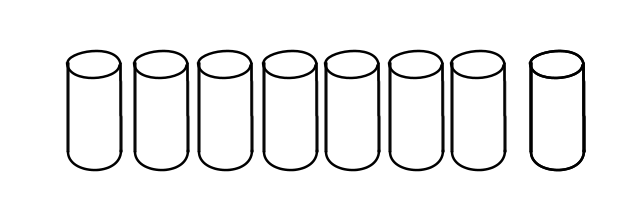
Eight, 2TB drives in a 7-disk RAID5 set. With hot-spare! 10.92TB of usable space! Not going to fill that in a hurry.

On this array we have defined several Volumes.
01-vols.png
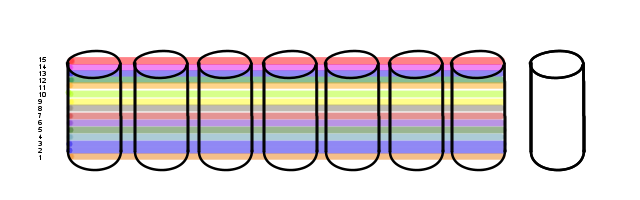
15 of them, in fact. One of which is two volumes merged together at the OS level (vols 2 & 3). That happens.

It just so happens that the particular use-case for this array is somewhat sequential. Most of the data stored on this bad boy is actually archival. The vasty majority of I/O is performed against the newest volume, with the older ones just sitting there for reference. Right now, with Vol 15 being the newest, Vol 1 hasn't had anything done to it in a couple of years.

That said, time is not kind to hard-drives.

Tape!

Tape isn't going away, much like mainframes never actually went away. However, their utility is evolving somewhat.

The emergence of the Linear Tape File System is quite interesting. It's an open tape format (nothing new there) that looks to have broad acceptance (the new part). Especially since the LTO governing body has adopted it, and LTO is the de-facto standard for tape in the industry right now.

Open standards make the long-term archive problem easier to tackle, since the implementation details are widely understood and are more likely to either still be in use or have industry expertise available to make it work should an old archive need to be read. They also allow interoperability; a "tier-5" storage tier consisting of tape could allow duplicates of the tape media to be housed in an archive built by another vendor.

In my current line of work, a data-tape using LTFS would be a much cheaper carrier for a couriered TB of data than a hard-drive would. We haven't seen this yet, but it remains a decided possibility.

Understandably, the video content industry is a big fan of this kind of thing since their files are really big and they need to keep them around for years. The same technology could be used to build a computer-image jukebox for a homebrew University computer-lab imaging system.

Looking around, it seems people are already using this with CloneZilla. Heh.

It's hard to get excited about tape, but I'll settle for 'interested'.

"How do I make my own Dropbox without using Dropbox" is a question we get a lot on ServerFault.

And judging by the Dropbox Alternatives question, the answer is pretty clear.

iFolder.

Yes, that Novell thingy.

I've used the commercial version, but the open-source version does most of what the paid one does. I suspect the end-to-end encryption option is not included, possibly due to licensing concerns. But the whole, "I have this one directory on multiple machines that exists on all of 'em, and files just go to all of them and I don't have to think about it," thing is totally iFolder.

The best part is that it has native clients for both Windows and Mac, so no futzing around with Cygwin or other Gnu compatibility layers.

An older problem

| 1 Comment
I deal with some large file-systems. Because of what we do, we get shipped archives with a lot of data in them. Hundreds of gigs sometimes. These are data provided by clients for processing, which we then do. Processing sometimes doubles, or even triples or more, the file-count in these filesystems depending on what our clients want done with their data.

One 10GB Outlook archive file can contain a huge number of emails. If a client desires these to be turned into .TIFF files for legal processes, that one 10GB .pst file can turn into hundreds of thousands of files, if not millions.

I've had cause to change some permissions at the top of some of these very large filesystems. By large, I mean larger than the big FacShare volume at WWU in terms of file-counts. As this is on a Windows NTFS volume, it has to walk the entire file-system to update permissions changes at the top.

This isn't the exact problem I'm fixing, but it's much like in some companies where granting permissions to specific users is done instead of to groups, and then that one user goes elsewhere and suddenly all the rights are broken and it takes a day and half to get the rights update processed (and heaven help you if it stops half-way for some reason).

Big file-systems take a long time to update rights inheritance. This has been a fact of life on Windows since the NT days. Nothing new here.

But... it doesn't have to be this way. I explain under the cut.