Recently in netware Category

Migrating off of NetWare

| 5 Comments
It has been around a year since we did the heavy lifting of migrating off of NetWare and retiring our eDirectory tree. By this point last year we had our procedures in place, we just needed to pull the trigger and start moving data around. I was asked to provide some hints about it, but the mail bounced with a 550-mailbox-not-found error *ahem*.

Because it's such a narrowly focused topic, and the WWU people who read me lived through it and therefore already know this stuff, I'm putting the meat of the post under the fold.

You're welcome.
There is a certain question that has shown up in pretty much every class about how to set up an X500-compliant directory service (thats things like Active Directory, NDS, and eDirectory). It goes like this:
You have been hired as a consultant to set up $FakeCorpName's new $Directory. They have major offices in five places. New York, Los Angeles, London, Sydney, and Tokyo. They have five $OldTech. What is the directory layout you recommend?
I originally ran into this particular question when I was getting my Certified Novell Administrator certification back in 1996. In that case $Directory was NDS and $OldTech was actually other NDS trees. In 2000/2001 when I was getting my Active Directory training, $Directory was AD and $OldTech was NT4 domains. The names of the countries did not vary much between the two. NYC and LA are always there, as are London and Tokyo. Sometimes Paris is there instead of Sydney. Once in a great while you'll see Hong Kong instead of Tokyo. In a fit of continental inclusiveness, I think I saw "Johannesburg" in there once (in an Exchange class IIRC). I ran into this question again recently in relation to AD.

This is a good academic question, but you will never, ever get it that easy in real life. This question is good for considering how geographically diverse corporate structure impacts your network layout and the knock-on effects that can have on your directory structure. However, the network is only a small part of the overall decision making process when it comes to problems like these.

The major part? Politics.

It is now 2010. Multi-national companies have figured out this 'office networking' thingy and have a pre-existing infrastructure. They have some kind of directory tree, somewhere, even if it only exists in their ERP system (which they all have now). They have office IT people who have been doing that work for 15+ years. A company that size has probably eaten bought out competitors, which introduces strange networking designs to their network. Figuring out how to glue together 5 geographically separate WinNT4.0 domains in 2010 is not useful. The problem is not technical, it's business.

1996
In 1996, WAN links were expensive and slow. NDS was the only directory of note on the market (NIS+ was a unix directory, therefore completely ignored in the normal business windows-only workplace). Access across WAN links was generally discouraged unless specifically needed. Because of this, your WAN links gave you the no-brainer divisions in your NDS tree where Replicas needed to be declared. All the replication traffic would stay within that site and only external reference resolution would cross the expensive WAN. Resources the entire company needed access to might go in a specific, smaller, replica that gets put on multiple sites.

This in turn meant that the top levels of your NDS tree had a kind of default structure. Many early NDS diagrams had a structure like this:
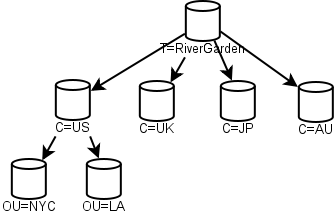
An early NDS diagram
Each of the top-level "C" containers was a replica. The US example was given to show how internal organization could happen. Snazzy! However, this flew in the face of real-work experience. Companies merge. Bits get sold off. By 2000 Novell was publishing diagrams similar to this one:
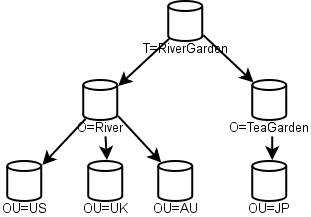
A later NDS diagram
This one was designed to show how company mergers work. Gone are the early "C" containers, in their place are "O". Merging companies? Just merge that NDS tree into a new O, and tada! Then you can re-arrange your OUs and replicas at your leisure.

This was a sign that Novell, the early pioneer in directories like this, had their theory run smack into reality with bad results. The original tree style with the top level C containers didn't handle mergers and acquisitions well. Gone was the network purity of the early 1996 diagrams, now the diagrams showed some signs of political influence.

2000
In 2000, Microsoft released Windows 2000 and Active Directory. The business world had been on the Internet for some time, and the .com boom was in full swing. WAN links were still expensive and slow, but not nearly as slow as they used to be. The network problem Microsoft was faced with was merging multiple NT4 domains into a single Active Directory structure.

In 2000, AD inter-DC replication was a lot noisier than eDirectory was doing at the time, so replication traffic was a major concern. This is why AD introduced the concept of Sites and inter-Site replication scheduling. Even so, the diagrams you saw then were reminiscent of the 1996 NDS diagrams:
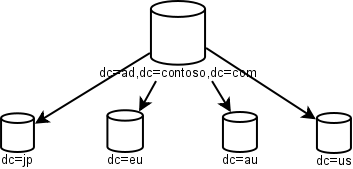
An early AD diagram
As you can see, separate domains for NYC and LA are gone, which is recognition that in-country WAN links may be fast enough for replication, but transcontinental links were still slow. Microsoft handled the mergers-and-acquisitions problem with inter-domain trusts (which, thanks to politics, tend to be hard to get rid of once in place).

AD replication improved with both Server 2003 and Server 2008. The Microsoft ecosystem got used to M&A activity the same way Novell did a decade earlier and changes were made to best practices. Also, network speeds improved a lot.

2010
In 2010 WAN links are still slow relative to LAN links, but they're now fast enough that directory replication traffic is not a significant load for all but the slowest of such links. Even trans-continental WAN links are fat enough that directory replication traffic doesn't eat too much valuable resources.
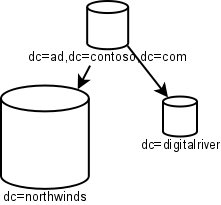
An AD tree in the modern era
Note how simple this is.There is an empty root to act as nothing but the root of an entire tree. Northwinds is the major company and it recently bought DigitalRiver, but hasn't fully digested it yet. Note the lack of geographic separation in this chart. WAN speeds have improved (and AD replication has improved) enough that replicating even large domains over the WAN is no longer a major no-no.


And yet... you'll rarely see trees like that. That's because, as I said, network considerations are not the major driver behind organization these days, it's politics.

Take the original question at the top of this post. Consider it 5 one-domain AD trees, and each country/city is its own business unit that's large enough to have their own full IT stack (people dedicated to server, desktop, web support, and developers supporting it all), and has also been that way for a number of years. This is what you'll run into in real life. This is what will monkey-wrench the network purity of the above charts.

The biggest influence towards whether or not a one-domain solution can be reached will be the political power behind the centralizing push, and how uncowed they get when Very Important People start throwing their weight around. If the CEO is the one pushing this and brooks no argument, then, well, it's more likely to happen. If the COO is the one pushing it, but caves to pressure in order to not expend political capital with regards to unrelated projects, you may end up with a much more fragmented picture.

There will be at least one, and perhaps as many as five, business units that will insist, adamantly, that they absolutely have to keep doing things the way they've always been doing it, and they can't have other admins stomping around their walled garden in jack-boots. Whether or not they get their way is a business decision, not a technical one. Caving into these demands will give you an AD structure that includes multiple domains, or worse, multiple forests.
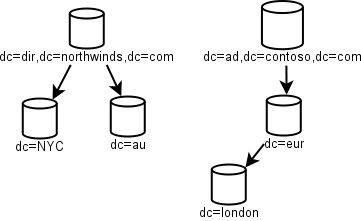
Fragmented AD environment
In my experience, the biggest bone of contention will be who gets to be in the Domain and Enterprise Admins groups. Those groups are the God Groups for AD, and everyone has to trust them. Demonstrating that only a few tasks require Domain Admin rights and that nearly all day-to-day administration can be done through effectively delegated rights will go a long way towards alleviating this pressure, but that may not be enough to convince business managers weighing in on the process.

The reason for this resistance is that this kind of structural change will require changes to operational procedures. You may think IT types are used to change, but you'd be wrong. Change can be resented just as fiercely in the ranks of IT-middle-managers as it is in rank-n-file clerks. Change for change's sake is doubly resented.

Overcoming this kind of political obstructionism is damned hard. It takes real people skills and political backing. This is not the kind of thing you can really teach in an MCSE/MCITP class track. Political backing has to already be in place before the project even gets off the ground.

I haven't been in an MCSE/MCITP class, so I don't know what Microsoft is teaching these days. I ran into this question in what looks like a University environment, which is a bit less up-to-date than getting it direct from Microsoft would be.  Perhaps MS is teaching this with the political caveats attached. I don't know. But they should be doing so.
On a Wednesday in August in 1996, the WWU NDS tree was born. There were other trees, but this is the one that everyone else merged into. The one tree to rule them all. That was NetWare 4. It brought the directory, and it was glorious (when it worked right).

And now, most of 14 years later, it is done. The last replica servers were powered off today after a two year effort to disentangle WWU from NetWare.

I have some blog-header text to change.

Password policies in AD

| No Comments
One of the more annoying problems with password and account-lockout policies in Active Directory has been that they apply to every account universally. I you want to force your users to change passwords every 90 days, with account lockout after a certain number of bad login attempts, then the same policies apply to your 'Administrator' user. Account lock-out was a really great way to DoS yourself in really critical ways.

In a way, that's what account-lockout is all about. It's to keep bad people from coming in, but its also a way for bad people from preventing legitimate people from using their own accounts. You need to take the good with the bad.

Since we were a NetWare shot for y-e-a-r-s we're very used to Intruder Lockout (ILO), and losing it during the move to Windows was seen as a loss of a key security feature. We had accounts that had to be exempted from lockout, which was dead easy in eDirectory but very difficult in AD.

Happily, Server 2008 introduces a way to do this. It's called "Fine-Grained Password Policy", and is NOT group-policy based. This was somewhat surprising. Getting this requires raising the domain and forest functional levels to the 2008 level. What it allows is setting password policy based on group memberships, with conflict resolution handled by a priority setting on the policy itself. Interestingly, the actual policies are created through ASDI Edit, so they're not beginner-friendly.

For instance, we can set a 'lock out after 6 tries in 30 minutes' setting to the Domain Users group at a Priority of 30, and a second 'never lock out ever' policy to the Domain Admins group at a Priority of 20. That way 'Administrator' will have the never-lock policy apply to it, but Joe User will have the lock-after-6-in-30 policy apply. This works best if the password policy specifies that Domain Admins need to have very complex and long passwords, which makes a brute-force cracking attempt take unreasonably long amounts of time.

We put this in place a few weeks ago, and it is working as we expected. SO GLAD to have this.

TCP problems

| 3 Comments
My testing for a cheap NAS solution has progressed to the option that costs the most money, Windows 2008 running KernSafe's iStorage. As it happens, it works really well when the iSCSI initiator is Windows but Linux clients don't really want to talk to it. Windows: 30-50 MB/s. Linux: 3-5 MB/s. Biiiig difference there.

Looking at packets I'm noticing a similar pattern on the wire to one I'd seen before. Back when I was troubleshooting exactly why NetWare backups to DataProtector were horrible I came across this problem. It seems that TCP Windowing is fundamentally broken between Server 2008 and NetWare which leads to really bad throughputs, which in turn is very bad for half TB backups. The receiving server seemed to feel the need to ACK after every two packets, which in turn really slowed things down. And that's what the Linux clients are doing for iSCSI to Server 2008.

It has to be something affecting basic TCP services but not complex protocols. Using smbclient to upload a 4GB DVD iso runs at 50MB/s but the iSCSI throughput on the same client is a piddly 3-5MB/s. I'm sure some kind of tuning on either side might be able to jar things loose, heaven knows Linux 2.6.31 is a heck of a lot more current on TCP settings than NetWare 6.5 SP8 is. I just haven't found it yet.

Conversely, Server 2008 talking to a Linux iSCSI client works at line speed pretty much. I'm testing this for completeness's sake. We need something that can serve up to 30TB via both iSCSI and SMB. My findings aren't fully complete yet, but in general:
  • OpenFiler: GREAT iSCSI host, completely blows for SMB in our environment.
  • OpenSolaris: Great iSCSI host, just can't convince the kernel-mode CIFS to join our domain. Also, worst-of-breed random I/O performance.
  • OpenFiler + Windows: OpenFiler for iSCSI, Windows (mounting an iSCSI share) for SMB. Should work GREAT. Current best-best for the future.
  • OpenSolaris + Windows: As previous option, but I/O problems make it less attractive.
  • Windows + KernSafe: GREAT SMB performance, solid iSCSI for Windows hosts. Linux hosts will take lots of tuning (perhaps, or it could be intractable).

The passing

| No Comments
At 16:40 this afternoon I issued the final 'cluster down' command on the WUF cluster. This 6 node NetWare cluster was born August 26, 2003 as NetWare 6.0. It replaced a trio of large file servers (Huey, Dewey, and Louie) that had been providing file-serving to campus, and allowed this critical function to be provided in a highly available way.

As of 16:40 April 12th, 2010, WWU Information Technology Services was no longer in the Novell File Serving business. Other entities on campus still provide this service. ITS continues to provide identity management and replica hosting to eDirectory.

The remains of WUF will be cleaned up over the next couple of days.
I'm going over some of my older posts and am reposting some of the good stuff that's still relevant. I've been at this a while, so there is a good week's worth of good essays hiding in the archives.
Shortly after the release of Novell OES SP1, the version of Open Enterprise Server based on SuSE Linux 9, I ran a benchmark series to determine just how it would hold up in our environment. The results were pretty clear: not that good. I re-ran some of the tests with later versions and it got a lot better. SP2 improved things significantly, and has gotten even better with OES2 (based on SLES10).

The long and short of it is that the 32-bit Linux kernel has some design constraints that simply prevented Novell from designing a NetWare-equivalent system when it came to NCP performance. The 64-bit kernel that came with OES2 helped a lot. Also, more intelligent assumptions about usage.

Our big problem was concurrency. Our cluster nodes regularly ran between 2000-6000 concurrent connections. Anyway, for details about what I found, read the series:

Benchmark Results Summary

It has pictures. Oooo!

That TCP Windowing fault

| 2 Comments
Here is the smoking gun, let me show you it (new window).

That's an entire TCP segment. Packet 339 there is the end of the TCP window as far as the NetWare side is concerned. Packet 340 is a delayed ACK, which is a normal TCP timeout. Then follows a somewhat confusing series of packets and the big delay in packet 345.

That pattern, the 200ms delay, and 5 packets later a delay measurable in full seconds, is common throughout the capture. They seem to happen on boundaries between TCP windows. Not all windows, but some windows. Looking through the captures, it seems to happen when the window has an odd number of packets in it. The Windows server is ACKing after every two packets, which is expected. It's when it has to throw a Delayed ACK into the mix, such as the odd packet at the end of a 27 packet window, is when we get our unstable state.

The same thing happened on a different server (NW65SP8) before I turned off "Receive Window Auto Tuning" on the Server 2008 server. After I turned that off, the SP8 server stopped doing that and started streaming at expectedly high data-rates. The rates still aren't as good as they were when doing the same backup to the Server 2003 server, but at least it's a lot closer. 28 hours for this one backup versus 21, instead of over 5 days before I made the change.

The packets you see are for an NW65 SP5 server after the update to the Windows server. Clearly there are some TCP/IP updates in the later NetWare service-packs that help it talk to Server 2008's TCP/IP stack.

Sniffing packets

| 2 Comments
When I first started this sysadmin gig 'round about 1997, Windows based packet sniffers were still in their infancy. In fact, the word 'sniffer' was (and probably still is) a trademarked term for the software and hardware package for, er, sniffing packets. Sniffer. So when I needed to figure out a problem on the network, I went to the Network Guys who plugged their Sniffer into any available port on the 10baseT hub I needed analysis on and went to work. They told me what was wrong. Like a JetDirect card transmitting packets whenever it sensed a packet on the wire, thus bringing the network to is knees. Things like that.

Time passed and Sniffer was bought by Network Associates. Who then added a zero to the price because that package really did have a lock on the market. The next rev then more than doubled the already inflated price. So when it came time to renew/upgrade, our Sniffer couldn't handle Fast Ethernet, the price was eye watering. So. On came the free sniffers.

At first I was using Ether Boy, a now long lost packet sniffer. But eventually I found Ethereal (now WireShark), and I went to work. By the time I left my old job in 2003 I already had a rep for knowing WTF I was looking at, and the network guys didn't bat an eyelash when I asked for a span port. This ability was very handy when diagnosing slow Novell logins.

Fast forward to now. Right now I'm trying to figure out why the heck a certain NetWare server is so slow talking to the Data Protector media agent. It isn't obviously a TSA problem, but I've had problems with DP and NW talking to each other on the TCP level so that's where I'm looking now. Unfortunately for me, the desktop-grade GigE nic I have on the span isn't, shall we say, resourced enough to sniff a full GigE stream without at least a few buffer overruns. So I'm not getting ALL of the packets.

When I asked for the span port, the telecom guy said he greatly respected my ability to dig in to TCP issues. And said it in the voice of, "I think you're better at that kind of troubleshooting than we are." Which is a bit disconcerting to hear from your telecom router-gods. But there it is. What it means is that I can't very well ask for help interpreting these traces.

So far I've been able to determine that there is something hinky going on with network delays. There are some 200ms delays in there, which hints strongly at a failed protocol negotiation somewhere. But there are some rather longer delays, and it could be due to window size negotiation problems. Server 2008, the media-agent server, has a much newer TCP/IP stack than NetWare so it is entirely possible that they just don't work well together. I don't understand that quite well enough to manually deconstruct what's going on, so that's what I'm googling on right now.

And why Saturday? Because of course the volume that's doing this is our single largest and it is on the weekend where it is in the failed state where I can pry the hood off and look. Who knows, I may resort to posting packets and crowd sourcing the problem.

Update 12/23/09: Found it.

Old hardware

| No Comments
Watching traffic on the opensuse-factory mailing list has brought home one of the maxims of Linuxdom that has been true for over a decade: People run Linux on some really old crap. And really, it makes sense. How much hardware do you really need for a router/firewall between your home network and the internet? Shoving packets is not a high-test application if you only have two interfaces. Death and fundamental hardware speed-limits are what kills these beasts off.

This is one feature that Linux shares with NetWare. Because NetWare gets run on some really old crap too, since it just works, and you don't need a lot of hardware for a file-server for only 500 people. Once you get over a 1000 or very large data-sets the problem gets more interesting, but for general office-style documents... you don't need much. This is/was one of the attractions for NetWare, you need not much hardware and it runs for years.

On the factory mailing list people have been lamenting recent changes in the kernel and entire environment that has been somewhat deleterious for really old crap boxes. The debate goes back and forth, but at the end of the day the fact remains that a lot of people throw Linux on hardware they'd otherwise dispose of for being too old. And until recently, it has just worked.

However, the diaspora of hardware over the last 15 years has caught up to Linux. Supporting everything sold in the last 15 years requires a HELL of a lot of drivers. And not only that, but really old drivers need to be revised to keep up with changes in the kernel, and that requires active maintainers with that ancient hardware around for testing. These requirements mean that more and more of these really old, or moderately old but niche, drivers are drifting into abandonware-land. Linux as an ecosystem just can't keep up anymore. The Linux community decries Windows for its obsession with 'backwards compatibility' and how that stifles innovation. And yet they have a 12 year old PII box under the desk happily pushing packets.

NetWare didn't have this problem, even though it's been around longer. The driver interfaces in the NetWare kernel changed a very few times over the last 20 years (such as the DRV to HAM conversion during the NetWare 4.x era, and the introduction of SMP later on) which allowed really old drivers to continue working without revision for a really long time. This is how a 1998 vintage server could be running in 2007, and running well.

However, Linux is not NetWare. NetWare is a special purpose operating system, no matter what Novell tried in the late 90's to make it a general purpose one (NetWare + Apache + MySQL + PHP = a LAMP server that is far more vulnerable to runaway thread based DoS). Linux is a general purpose operating system. This key difference between the two means that Linux got exposed to a lot more weird hardware than NetWare ever did. SCSI attached scanners made no sense on NetWare, but they did on Linux 10 years ago. Putting any kind of high-test graphics card into a NetWare server is a complete waste, but on Linux it'll give you those awesome wibbly-windows.

There comes a time when an open source project has to cut away the old stuff. Figuring this out is hard, especially when the really old crap is running under desks or in closets entirely forgotten. It is for this reason that Smolt was born. To create a database of hardware that is running Linux, as a way to figure out driver development priorities. Both in creating new, missing drivers, and keeping up old but still frequently used drivers.

If you're running a Pentium 2-233 machine as your network's NTP server, you need to let the Linux community know about it so your platform maintains supportability. It is no longer good enough to assume that if it worked in Linux once, it'll always work in Linux.

Other Blogs

My Other Stuff

Monthly Archives